Note: It’s not that I watch much television, because it’s bad programming. I just want to be able to. Nobody asks the mountain climber “what are you doing up there?”
I’ve been looking for a way to watch analog TV on mobile devices for some time. A couple of things I tried were not satisfactory, mainly because my goal was to have my good ol’ Pentium IV torrent server do the work. Orb seemed like a good solution, but it required my main computer to be powered on since a Pentium IV is just not good enough for real-time transcoding etc. I also found Orb unstable, with lots of different versions. The last couple of versions did either not detect any of my 5 tv cards, or found no channels.
I heard of MythTV before, had experimented a bit with it a couple of years ago, and thought I’d give it another go.
I quickly found out there is a “pre-installed” Ubuntu version called MythBuntu.
Since I’m reasonably experienced with Ubuntu, I chose to go with MythBuntu 12.04.1.
I noticed that there are lots of tutorials out there, but they all cover only part of the process, and some are outdated. Here’s how I did it.
Hardware
The hardware I’m using is quite old. It’s a 2.4Ghz Pentium IV with 1GB RAM, a 80Gb boot disk, 500Gb media storage and a WinTV PVR-150. The main advantage of this card is that it hardware-encodes to MPEG-2, thus reducing the load on the poor CPU. If I can get this to stream unaltered… then there will be virtually no system load.
Keep in mind that I’m in the Netherlands, so channels and Program Guide is based on that country.
Installation
I installed MythBuntu using Universal USB Installer. I did rename “mythbuntu-12.04.1-desktop-i386.iso” to “mythbuntu-12.04-desktop-i386.iso” so the Installer could see the installation ISO. Installation is very straight-forward, and for this howto I assume you have installed Linux (or Ubuntu) before. A 2GB swap partition, and the rest mounted as /. The 500Gb media storage disk is mounted under /MEDIA. I installed SAMBA services so I could access the files from my home network.
Avoid multiple video devices getting mixed up
Note: if you have only 1 video device, you can skip this step completely and go to “MythTV Configuration”
Because this part of the tutorial is quite lengthy, I have moved it to a page of its own.
MythTV Configuration
Using MythBuntu makes installation a lot easier, because almost everything you need is included in the installation.
Time to setup the MythTV Backend with my PVR-150:
– start MythTV Backend Setup from the menu
– go to “General” and set your TV-format and channel frequency table. In my case since I’m in Holland PAL-BG, europe-west, timezone +0100. Press “enter” until you’re back in the main menu.
– go to “Capture Cards”
– choose “New capture card”, and select “MPEG-2 encoder card” for the PVR-150.
– in the “video device” field, type “/dev/video-PVR-150” or the link name you have created with udev rules. Do NOT use “/dev/video0” or else you risk getting mixed up video devices after reboot. When you have typed in the name of your video device, the name should become visible behind “probed info”. In my case it says “Hauppauge WinTV PVR-150 [ivtv]” so I know I’m doing ok.
– press “Finish”
– now go back to the main menu and choose “Video Sources” then “New video source”.
– In the “Video source name” type “WinTV” or any name that you’d like to choose for your device. Leave the Listings grabber to “none” for now. Press “Finish”.
– now from the main menu choose “Input connections“.
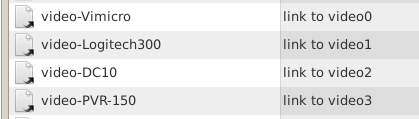
You will now see a list of available inputs, followed by “-> (None)”. Note that the names should match the udev links you have created.
– now look for your tuner, in my case “[ MPEG : /dev/video-PVR-150 ] (Tuner 1)” and select it.
– now we will connect this tuner input to a video source:
Capture device: [ MPEG : /dev/video-PVR-150 ]

Display name: WinTV

Video source: WinTV
(or however you named your source in the previous step)
– Press “Next”, “Finish”, do not scan for channels. Maybe it will work for you, but my howto is based on the PVR-150, and MythTV will NOT find any channels on that card.
– Exit the MythTV Backend Setup, your root password will be asked to restart the backend, and choose “yes” if asked to run “mythfilldatabase”.
It seems nice to add channels manually, but I found out that the “xmltv program guide” system can do this for you.
Program Guide
This part is specific for the Netherlands, but it might work similar in your country.
I used the howto from tvgrabnlpy
– Download the latest version and rename to “tv_grab_nl_py”
– Backup your existing grabber:
sudo mv /usr/bin/tv_grab_nl /usr/bin/tv_grab_nl.backup
– move the grabber you downloaded to “/usr/bin”
(use thunar as root, or type sudo mv ./tv_grab_nl_py /usr/bin/tv_grab_nl)
– make the grabber executable: chmod ugo+x /usr/bin/tv_grab_nl_py
– get the program list by executing the script: tv_grab_nl_py
– now the channel list is put in “${HOME}/.xmltv/tv_grab_nl_py.conf”
– edit this file and remove all the channels that you do not need (or you know you can’t receive). You can also put a # in front of a channel name you do not want.
Ok, now it’s time to tell MythTV that we have a listings grabber. Open the MythTV Backend Setup again, and go to “Video Sources“.
– Select “WinTV” (or the card you have set up) and change the listing grabber to “The Netherlands (tv_grab_nl_py version xxx)”
– Press “Finish” and exit the Backend Setup.
– look up your local analog tv frequencies and have them ready. Here is an example of a dutch frequency table:

NOTE: the frequency table might be in Hz or KHz, but if the table says “175,250” you should enter “175250” in MythTV Backend Setup.
– now in a terminal type:
sudo tv_grab_nl_py --config-file /home/yourname/.xmltv/tv_grab_nl_py.conf --days 3 --slowdays 1 --output /var/tmp/tvgrabnl/list.xml (where “yourname” should of course be replaced by your own username)
Note: this might take a long time to complete!
– and then send the data to MythTV:
sudo mythfilldatabase --file --sourceid 1 --xmlfile /var/tmp/tvgrabnl/list.xml --manual
This fetches the Program Guide for three days, and one day detailed information. Here’s the fun part: by using the “–manual” parameter, you will be asked to fill in the details for all missing channels. So have your frequency table ready.
Auto-updating the Program Guide
In order to auto-update the program listings every night, we make a script.
– in the terminal, type gedit ./update-epg.sh This will create an empty script. This should be the contents:
#!/bin/sh
basename=`date '+%A%Hh'`
mkdir -p "/var/tmp/tvgrabnl"
mkdir -p "/var/log/tvgrabnl"
xmlfile="/var/tmp/tvgrabnl/$basename.xml"
logfile="/var/log/tvgrabnl/$basename.log"
conffile="/home/server/.xmltv/tv_grab_nl_py.conf"
tv_grab_nl_py --config-file $conffile --days 3 --slowdays 1 --output $xmlfile --cache tvgrab.cache 2> $logfile
# Import into mythTV
export QTDIR=/usr/lib/qt3
mythfilldatabase --update --file --sourceid 1 --xmlfile $xmlfile
– make the script executable by typing chmod ugo+x ./update-epg.sh
– test the script by typing sudo ./update-epg.sh
– now make a cron job for this script and run it every night around 04:30.
You can also get the script here.
Note: the tutorials I found on the internet were outdated, the syntax for tv_grab_nl_py has been changed recently.
Mobile Device
There are two things to set up: 1) the web-based program guide & MythWeb and 2) some app to watch live TV with
The first is simple: just type in the IP-address of your MythBuntu server in your mobile browser.
If everything worked out, you’ll see something like this:

I have two Android-based devices, I have no experience on Apple products (sue me).
For Android there is a great little appcalled “MythFronTend“. Thanks to the maker(s) for keeping it free of charge. Support them if you can.
The setup of MythFrontEnd is very straight-forward:
Host = the ip address of your MythBuntu server
Port = leave standard
MySQL server = the ip address of your MythBuntu server
Port, DBName, Username = leave standard
MySQL password = you can find this in the MythFrontEnd on your MythBuntu server, under “Setup” => “General”
SSH tunnel => on
SSH tunneling host = the ip address of your MythBuntu server
SSH Port = leave standard
Username = your MythBuntu username
Password = your MythBuntu password
The result
And if you did this correct.. and all of the above… you can now watch, record, pause and playback HQ analog TV streamed to your Android device:

The best part is: because the PVR-150 is a hardware MPEG-2 encoding card, and my Tab and phone support this format, there is almost NO CPU usage anywhere along the line.
The MythBuntu server runs at an easy 5-10% CPU while streaming at 720×576 pixels!